PUBLIC SAFETY COMMUNICATIONS
The Police and Sheriff Community Newsletter Playbook
What to include, what to leave out, how often to send, and how to grow a list of residents who actually asked to hear from you.
 by Isabella Torres · Last updated: 2026-11-13
A police department newsletter is a regular email, usually monthly, that a police department or sheriff’s office sends to residents who signed up. It should include a message from the chief or sheriff, community events, seasonal safety tips, recruitment news, program spotlights and how to report non-emergencies. It never replaces emergency alerts.
Done well, a police community newsletter becomes the calm, predictable channel between big news days. Residents learn who their officers and deputies are, which programs exist, and where to go for help that is not urgent. This guide covers the sections, the topics to keep out, cadence, list growth and the setup an agency needs, using Mailsoftly as the worked example.
New here? Start with our primer on Email Marketing for Government for the fundamentals, then come back to this guide.
Buying for a public agency? Mailsoftly accepts purchase orders and invoices, includes migration help, and has a team you can talk to before you buy.
Book a demo →
Key Takeaways
A police or sheriff community newsletter is a recurring email from a law enforcement agency to residents who chose to receive it, focused on programs, people, events and prevention. It runs on a schedule, usually once a month, and its job is relationship building: residents who know the agency between incidents tend to trust it more during them.
The format sits alongside, not on top of, the tools an agency already uses. Social media handles quick updates. The emergency notification system handles urgent, location-specific instructions. The newsletter handles everything that deserves more than a post but is not urgent: a new school resource officer, a youth academy opening for applications, a seasonal reminder about vehicle break-ins, or the date of the next community meeting.
If you have read our guide on how to write a city newsletter residents read, the structure will feel familiar. The difference is tone and boundaries. A public safety newsletter has to be warm without being casual, and it has to be disciplined about what it never prints. Picture the City of Brimhaven Police Department sending a monthly update from [email protected], or the Alderwick County Sheriff’s Office sending one from [email protected]. Same audience as the city, different promises.
Want to see how this would work for your agency? Walk through it with the Mailsoftly team.Book a demo →
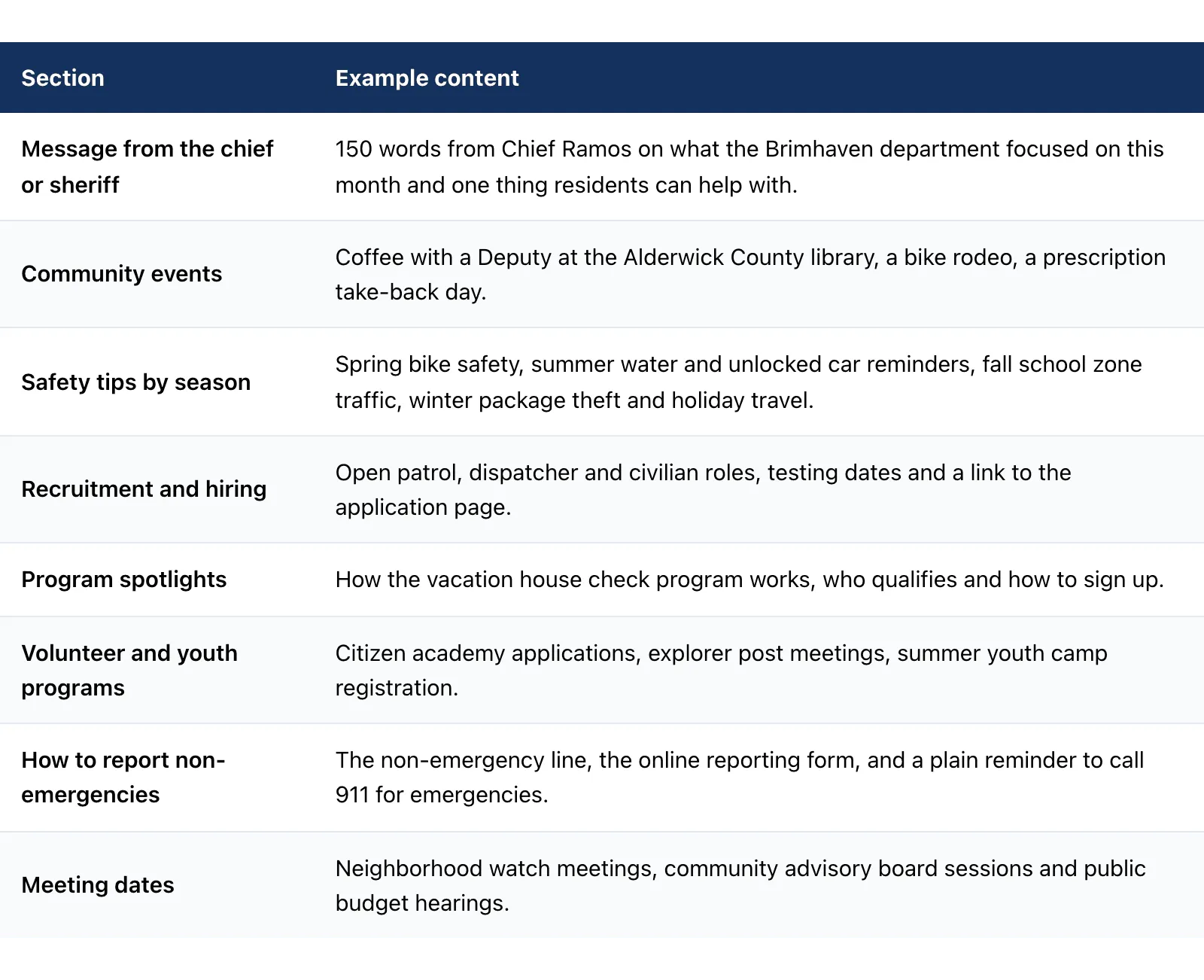
A police department newsletter should include a short message from the chief or sheriff, upcoming community events, seasonal safety tips, recruitment news, a program spotlight, volunteer and youth opportunities, how to report non-emergencies and public meeting dates. You do not need all eight every month. Rotate four to six, and keep the leader message and the non-emergency section in every issue.
| Section | Example content |
|---|---|
| Message from the chief or sheriff | 150 words from Chief Ramos on what the Brimhaven department focused on this month and one thing residents can help with. |
| Community events | Coffee with a Deputy at the Alderwick County library, a bike rodeo, a prescription take-back day. |
| Safety tips by season | Spring bike safety, summer water and unlocked car reminders, fall school zone traffic, winter package theft and holiday travel. |
| Recruitment and hiring | Open patrol, dispatcher and civilian roles, testing dates and a link to the application page. |
| Program spotlights | How the vacation house check program works, who qualifies and how to sign up. |
| Volunteer and youth programs | Citizen academy applications, explorer post meetings, summer youth camp registration. |
| How to report non-emergencies | The non-emergency line, the online reporting form, and a plain reminder to call 911 for emergencies. |
| Meeting dates | Neighborhood watch meetings, community advisory board sessions and public budget hearings. |
The leader message usually sets the tone for the whole issue, so put it first and keep it short. Write it in the first person, name one concrete thing the agency did, and end with one specific ask, such as registering for the citizen academy. Residents respond to a person far more than to a department seal, and a consistent voice from the chief or sheriff is what makes the newsletter feel like a conversation rather than a press release.
Slow months are the best time for people stories and explainers. Introduce a dispatcher and what a typical shift looks like. Explain how traffic complaints are prioritized. Answer the three questions the front desk heard most this month. Share a photo from the K9 unit’s school visit. Explain what happens after someone files an online report. None of these depend on an incident, and all of them build familiarity.
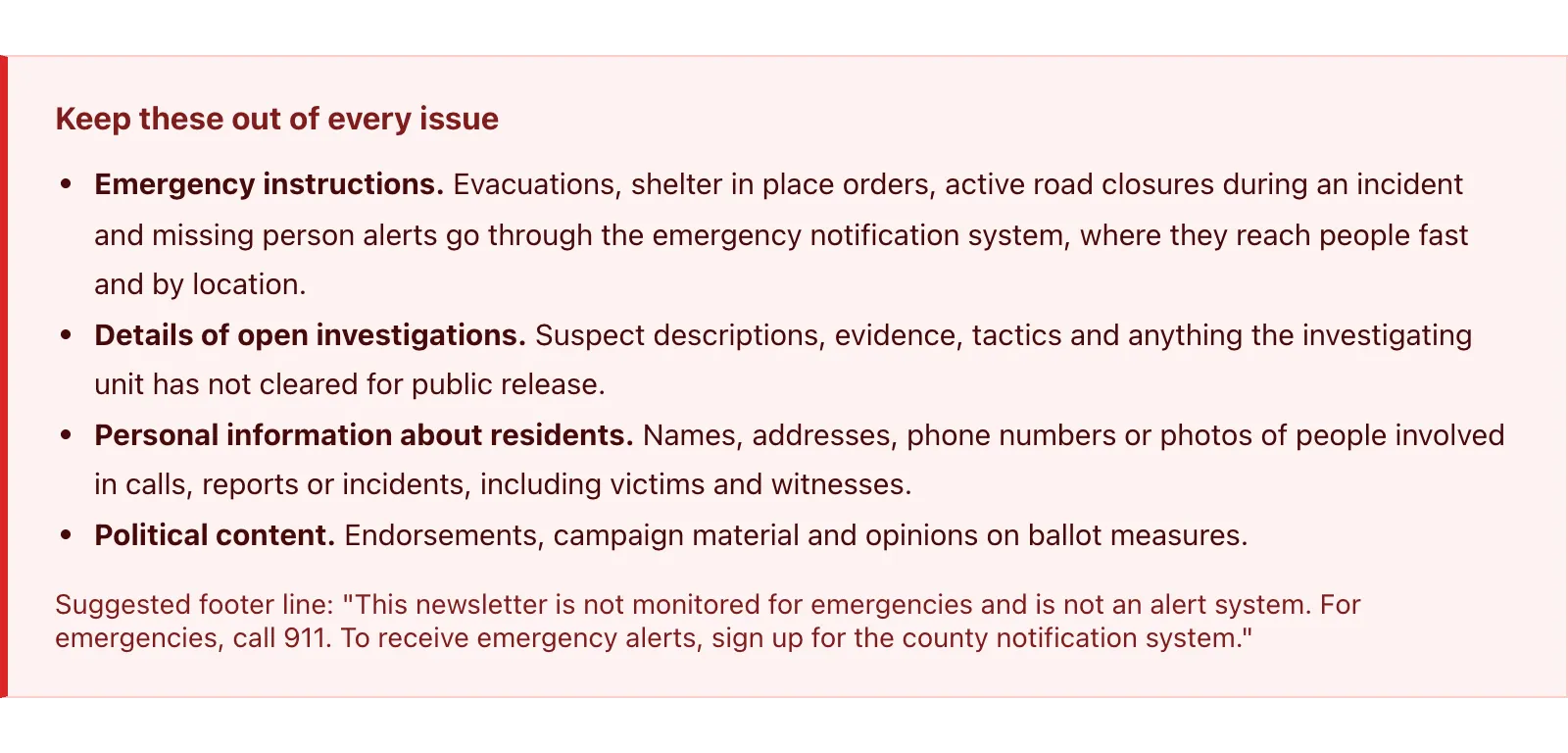
A police newsletter should never include emergency instructions, details of open investigations, or personal information about residents. Those three categories either belong in a different system or should not be published at all. A newsletter is not an emergency notification system, and the agency should say that plainly in every issue so no resident relies on it during an incident.
Keep these out of every issue
Suggested footer line: “This newsletter is not monitored for emergencies and is not an alert system. For emergencies, call 911. To receive emergency alerts, sign up for the county notification system.”
The reason is timing as much as privacy. A monthly email can sit unread for days, may be filtered into a promotions tab, and goes to whoever subscribed rather than to everyone in an affected area. Urgent public safety information needs a channel built for speed and geography. Use the newsletter to promote sign-ups for that alert system instead, which is one of the most useful links it can carry.
Set a simple review rule internally: any item that mentions a specific incident gets a second read from whoever handles public information before it goes out. The safest issues are built around programs, prevention and people, and those also tend to be the easiest issues to fill every month.
Most police departments and sheriff’s offices should send a newsletter once a month, with each issue running roughly 400 to 700 words across four to six short sections. Monthly is frequent enough to stay familiar and slow enough for a small team to sustain. Smaller agencies with limited staff can start quarterly and move to monthly once the routine holds.
Monthly
Default for most departments and sheriff’s offices. Same week every month, four to six sections.
Quarterly
Fits small agencies with one part-time editor. Longer issue, built around a seasonal theme.
Special editions
Two or three a year at most: a hiring push, an annual report summary, a new program launch.
Consistency matters more than frequency. Residents come to expect the newsletter on, say, the first Tuesday of the month, and a predictable rhythm also keeps internal contributors on schedule. Our roundup of public sector email newsletter best practices covers send timing, accessibility and editorial calendars across agency types if you want a deeper planning template.
For length, write for a phone screen. Each section gets a headline, two or three sentences and one link to more detail on the agency website. Use real text rather than images of text, add alt text to every photo, and keep fonts large with strong contrast so the email works for older residents and screen reader users. Litmus has a practical guide to accessible email design that covers these basics in detail.
Build the list through opt-in only: sign-up sheets or tablets at community events, a form on the agency website and QR codes on printed materials. Every subscriber should have asked to receive the newsletter. Never import contacts from incident reports, permits, citations, records requests or any other file the agency holds for a different purpose, and never buy or rent a list.
Opt-in list building checklist
| ✓ | Signup form on the homepage, the community programs page and the contact page |
| ✓ | Tablet or paper sign-up at National Night Out style events, open houses and school visits, with a consent line |
| ✓ | QR code on printed safety flyers, lobby posters, recruitment cards and vehicle magnets for community officers |
| ✓ | Confirmation email (double opt-in) so every address is real and intentional |
| ✓ | Interest checkboxes: events, hiring, youth programs, neighborhood watch |
| ✗ | No contacts pulled from reports, records, permits or citations |
| ✗ | No purchased, rented or shared lists |
The records rule protects trust more than anything else on this page. A resident who called about a stolen bicycle did not agree to marketing email, and receiving one would feel like their report was repurposed. Keep the newsletter list completely separate from operational data, and make the unsubscribe link easy to find in every issue.
Give people a reason to join. “Get the monthly community update: events, hiring and safety tips from the Alderwick County Sheriff’s Office” works better than “Subscribe to our newsletter.” Cross-promote with partners too: the city newsletter, the school district and the library can each mention the police update once a season. For more ideas on turning those subscribers into participants, see our guide to citizen engagement email campaigns.
A good police newsletter template is a single column with a branded header, a short leader message, three to five content blocks, a non-emergency reporting block and a footer that states the newsletter is not an alert system. Build it once, save it, and reuse it every month so each issue only needs new text and photos.
Template outline: City of Brimhaven Police Department monthly update
Subject lines that name a specific, local benefit work best for a sheriff newsletter or police update. Lead with the most useful item in the issue, keep it under about 50 characters where possible, and avoid alarm words that could be mistaken for an emergency. Five examples:
Pair each subject line with preview text that adds a second reason to open, such as “Plus: neighborhood watch dates and a new online reporting form.” Avoid words like “urgent,” “alert” or “warning” in a routine newsletter. Reserving them for genuine emergencies keeps the alert system credible.
A police or sheriff newsletter needs an email platform that sends from the agency’s own domain, supports several staff editors, and can be bought through public procurement. Options include Mailsoftly, which accepts purchase orders, invoices and payment by check, as well as Constant Contact and Mailchimp. Check sender authentication, user access and billing terms before anything else.
Send from an address on the agency domain and authenticate it with SPF, DKIM and DMARC records. SPF lists which servers may send for the domain, DKIM signs each message so changes made in transit can be detected, and DMARC tells mailbox providers what to do with mail that fails those checks. Together they help residents’ inboxes trust the newsletter and make it much harder for someone to impersonate the department, which matters for any public safety sender. Your IT team or domain administrator adds the records once, and the email platform provides the values.
Yes. In Mailsoftly several staff members and departments can work in one account, so the public information officer can draft, the community services unit can add events and a command staff member can review. On Enterprise plans that means unlimited users, no per-seat charges. Administrators can require two-step verification, restrict sign-in to Microsoft work accounts, set automatic sign-out and switch Mailsoftly support access off, and an activity log records changes. Application and customer data are hosted in a single United States region, with TLS in transit and encryption at rest. The underlying infrastructure providers are SOC 2 Type II audited and ISO 27001 certified, and a Regulated Environment profile, with AI features off by default, is available by contract for public sector customers. Full details are on the Mailsoftly security practices page, and security documents are available on request.
Yes. Mailsoftly accepts purchase orders, invoicing and payment by check, with no credit card required. Annual billing arrives on one invoice with Net 30 terms, and a W-9 and a data processing agreement are available on request. Mailsoftly is GDPR compliant. Migration help from Constant Contact and Mailchimp, covering lists and templates, is included, and support comes from real people. The overview of Mailsoftly as an email marketing platform for government agencies summarizes procurement, onboarding and support in one place.
Mailsoftly plans start free for up to 500 contacts and 2,000 emails a month, which is enough to pilot a newsletter. Paid plans are priced by contacts, with the monthly price shown first and the annual rate alongside (as of 2026-10-18):
| Mailsoftly plan | Billed monthly | Billed annually | Contacts | Emails per month |
|---|---|---|---|---|
| Free | $0 | $0 | 500 | 2,000 |
| Starter | $19/mo | $15/mo | 1,000 | 10,000 |
| Basic | $49/mo | $39/mo | 5,000 | 40,000 |
| Business | $99/mo | $79/mo | 15,000 | 150,000 |
| Premium | $199/mo | $159/mo | 30,000 | 300,000 |
| Enterprise | Custom | Custom | Unlimited | Unlimited |
A department sending one monthly issue to a few thousand opted-in residents typically fits Basic, while a countywide sheriff’s office with a larger list may look at Business, Premium or Enterprise. Mailsoftly signup forms can be embedded on the agency website, including WordPress sites, and Zapier, Google Workspace and Microsoft 365 connections are available for teams that want to tie the newsletter into existing tools.
A police community newsletter is working when subscribers grow steadily, unsubscribes stay low and readers click through to programs, applications and event pages. Clicks are the clearest signal, because opens are inflated by privacy features in some mail apps. Track which sections earn clicks each month and give the winners more space in the next issue.
Review these numbers quarterly with whoever approves the newsletter. A short one-page summary, such as “subscribers up, hiring clicks led again, youth camp filled from newsletter sign-ups,” keeps command staff invested and makes the case for continuing the work. Over a year, that steady record is what turns a newsletter from a side task into a trusted public safety newsletter residents look forward to.
For the broader picture on this topic, see our complete Email Marketing for Government guide, which covers strategy, fundamentals, and advanced playbooks.
Once a month is the right cadence for most police departments and sheriff’s offices. Monthly keeps the agency familiar without overwhelming residents or staff. Small agencies with limited capacity can start quarterly, and two or three special editions a year, such as a hiring push, are fine on top of the regular schedule.
No, a newsletter cannot replace emergency alerts. It reaches only people who subscribed, it can sit unread for days and it is not targeted by location. Urgent instructions belong in the emergency notification system. Use the newsletter to encourage residents to sign up for alerts, and state in every issue’s footer that it is not an alert system.
The public information officer or community services staff should usually own the newsletter, with the chief or sheriff writing the leader message. Other units contribute items such as hiring updates or youth program news, and one designated person reviews anything that mentions a specific incident before it is sent.
Ask them directly at every point of contact: a signup form on the agency website, sign-up at community events and QR codes on flyers, posters and recruitment cards. Explain what they will receive and how often. Use double opt-in, and never add people from reports, records or purchased lists.
Mailsoftly works well for a police newsletter because it accepts purchase orders, invoices and payment by check, offers unlimited users with no per-seat charges on Enterprise plans and includes migration help. Constant Contact and Mailchimp are other platforms agencies often compare. Whichever you choose, confirm domain authentication, multi-user access and procurement terms first.
See Mailsoftly with your agency in mindBook a demo →
Purchase orders and invoices accepted. Migration help included.
Ready to boost your email marketing?
Send beautiful, targeted emails that convert. Free plan available, paid plans from $15 a month.
Try Mailsoftly FreeNo credit card required