SMTP & Deliverability Reference
SMTP error codes, decoded by provider
Gmail, Microsoft 365 and Yahoo bounce codes side by side, with what each one means, when to retry, and how to fix it.
 by Isabella Torres · Last updated: 2026-10-29
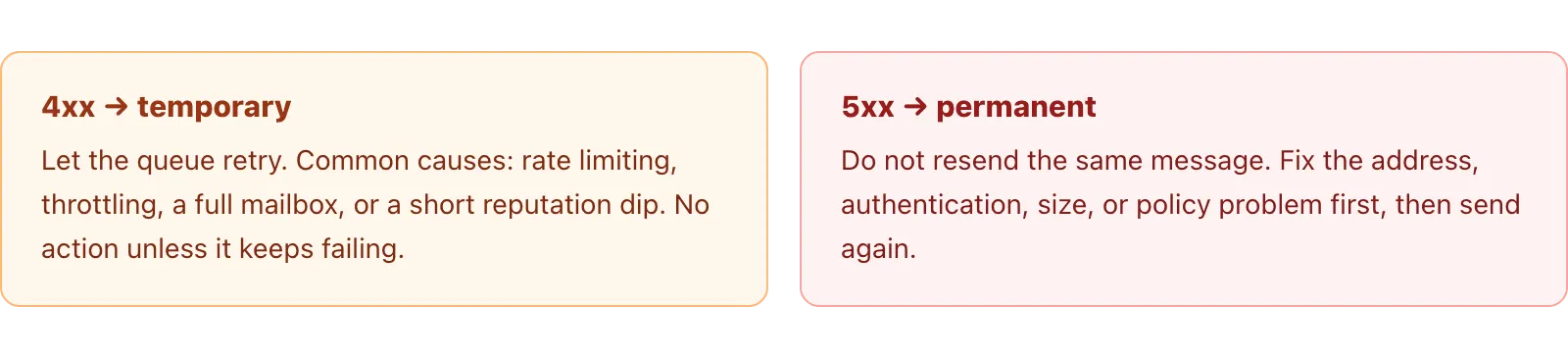
An SMTP error code is the three-digit reply a mail server returns when a message cannot be delivered. 4xx codes are temporary, so you retry later. 5xx codes are permanent, so you do not retry unchanged. An attached enhanced code like 5.7.26 pinpoints the cause: address, mailbox, policy, or authentication. The same code can mean different things at Gmail, Microsoft 365, and Yahoo.
That last point is why bounce reports confuse people. Gmail, Microsoft and Yahoo all follow the same standards, but each writes its own meanings into the enhanced codes, and vendor blogs copy stale Yahoo tables that no longer match the official page. This guide puts the three providers side by side, pulled only from their own documentation, so you can read any bounce and act on it.
Whether you send from a server, a help desk, or a platform like Mailsoftly, the codes below behave the same way. The difference is how much work you have to do to translate them, which the final section covers.
New here? Start with our primer on Email Deliverability & Authentication for the fundamentals, then come back to this guide.
Quick context: Mailsoftly offers transparent pricing, free hands-on migration, and human support. 500 contacts and 2,000 emails per month, no credit card.
Start free with Mailsoftly →
Key Takeaways
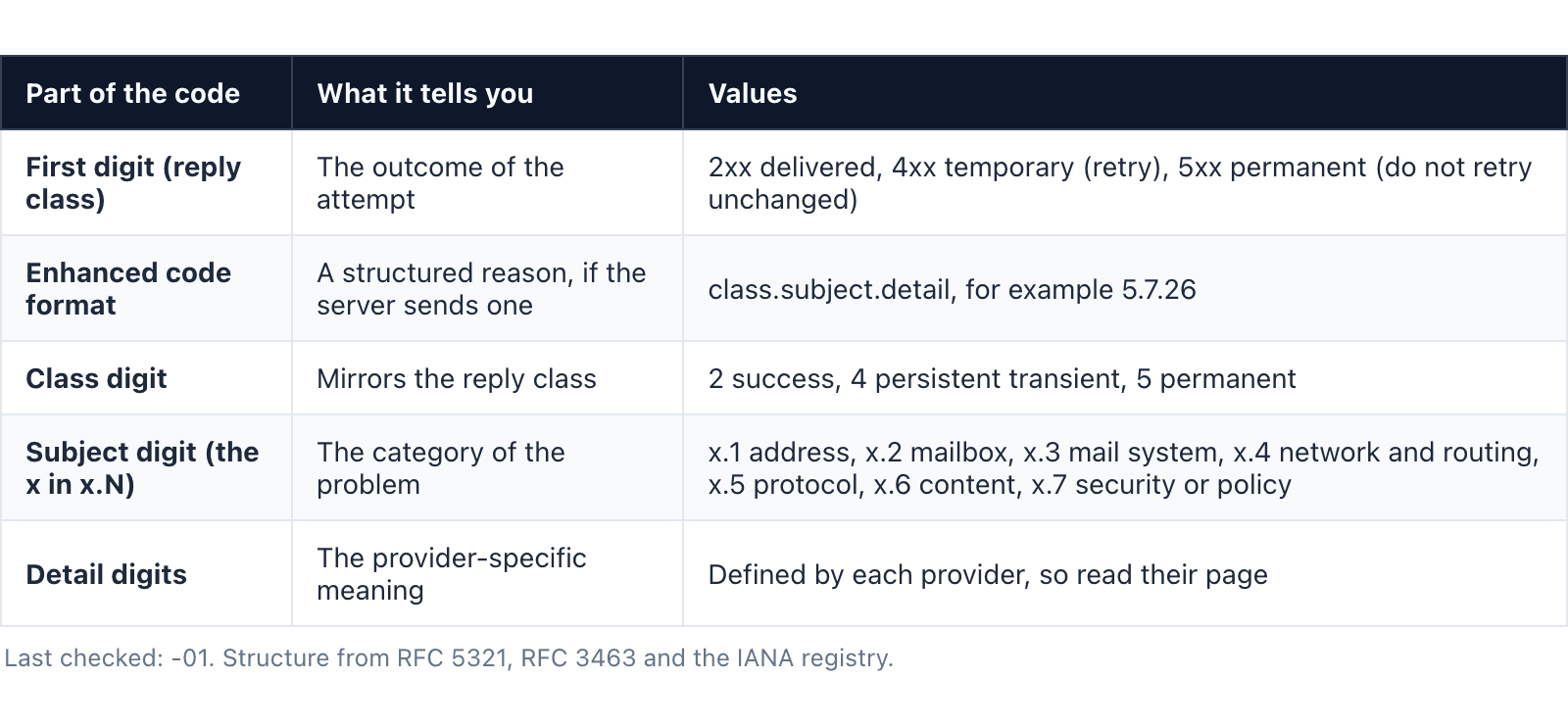
An SMTP error has two parts: a three-digit reply code and, usually, an enhanced status code. The reply code comes from the base protocol in RFC 5321: the first digit is the outcome (2 success, 4 transient failure, 5 permanent failure). The enhanced code adds precision in the form class.subject.detail, defined in RFC 3463 and catalogued in the IANA enhanced status code registry.
Read a code like 550 5.7.26 from left to right. The 550 says permanent failure. The 5 repeats that. The 7 is the subject group, which here means security or policy. The 26 is the provider-specific detail. The subject digit is the fastest way to guess a cause before you look anything up.
| Part of the code | What it tells you | Values |
|---|---|---|
| First digit (reply class) | The outcome of the attempt | 2xx delivered, 4xx temporary (retry), 5xx permanent (do not retry unchanged) |
| Enhanced code format | A structured reason, if the server sends one | class.subject.detail, for example 5.7.26 |
| Class digit | Mirrors the reply class | 2 success, 4 persistent transient, 5 permanent |
| Subject digit (the x in x.N) | The category of the problem | x.1 address, x.2 mailbox, x.3 mail system, x.4 network and routing, x.5 protocol, x.6 content, x.7 security or policy |
| Detail digits | The provider-specific meaning | Defined by each provider, so read their page |
Last checked: 2026-11-01. Structure from RFC 5321, RFC 3463 and the IANA registry.
Read enough? Try Mailsoftly free with 500 contacts and 2,000 emails per month, no credit card.Start free with Mailsoftly →
Retry a 4xx, fix a 5xx. A 4xx code means the server could not accept the message right now but might accept the same message later, so your mail server queues it and retries automatically over the next hours or days. A 5xx code means the server refused permanently, so resending the identical message only earns another rejection and can hurt your sending reputation.
You rarely retry by hand. A proper mail server or sending platform handles 4xx retries with backoff and gives up after its timeout, at which point a 4xx becomes a delayed delivery warning rather than a hard bounce. For a 5xx you change something first: correct the address, fix authentication, reduce volume, or request delisting, and only then resend.
The table below is the heart of this guide: one row per code, with the meaning as each provider states it. The cells are filled only where the official page says so. Gmail meanings come from Google Workspace SMTP errors and codes, Microsoft meanings from the Exchange Online NDR reference, and Yahoo meanings from the Yahoo Sender Hub error codes page. Yahoo cells stay generic on purpose, because Yahoo publishes only broad reply codes plus TS and PH prefixes, not the bracketed tags that vendor blogs copy.
| Code | Gmail | Microsoft 365 / Outlook.com | Yahoo | Type | What to do |
|---|---|---|---|---|---|
| 421 4.7.0 | Low reputation, missing PTR, TLS required, or rate limited | n/a | Temporary block, TS deferral tags | Temp | Slow down, check PTR, TLS and reputation, let the queue retry |
| 450 4.2.1 | Recipient is receiving mail too quickly (throttled) | n/a | n/a | Temp | Reduce send rate and retry later |
| 451 | n/a | n/a | Temporary, including a DNS failure on your sending domain | Temp | Check your sending domain DNS, then retry |
| 452 4.2.2 | Recipient mailbox is full | n/a | n/a | Temp | Retry later; it may clear |
| 550 5.1.1 | The account does not exist | Bad destination mailbox address | n/a | Permanent | Remove the address from your list |
| 5.1.10 | n/a | Recipient not found or does not exist | n/a | Permanent | Remove the address |
| 5.2.2 | 552 5.2.2: mailbox is full and inactive | Submission quota exceeded (the sender hit a limit) | n/a | Varies | Read the provider: clean the recipient at Gmail, ease your send rate at Microsoft |
| 552 5.3.4 | Message exceeds size or header limits | n/a | n/a | Permanent | Shrink the message or attachments |
| 550 5.4.5 / 5.1.90 | 5.4.5: daily sending quota exceeded | 5.1.90: daily recipient limit reached | n/a | Temp | Wait for the limit to reset, then resend |
| 550 5.7.1 | Policy block: likely unsolicited, very low reputation, or header problems | Delivery not authorized, unable to relay, or client not authenticated | n/a | Permanent | Fix relay and authentication, repair reputation |
| 5.7.23 | n/a | SPF validation failed | n/a | Permanent | Fix your SPF record |
| 550 5.7.26 | SPF and DKIM both failed, or a DMARC policy rejection | n/a | n/a | Permanent | Pass SPF and DKIM and align them to your domain |
| 5.7.27 / 5.7.30 / 5.7.32 / 5.7.40 | Bulk sender checks: SPF fail, DKIM fail, From not aligned, no DMARC record | n/a | n/a | Permanent | Meet the bulk sender rules: SPF, DKIM, aligned From, published DMARC |
| 5.7.509 | n/a | DMARC check failed with a p=reject policy | n/a | Permanent | Send only from domains that pass DMARC |
| 550 5.7.515 | n/a | Outlook.com high-volume sender requirements not met | n/a | Permanent | Meet the Outlook.com bulk sender requirements |
| 5.7.606 to 5.7.649 | n/a | Sending IP is banned by Microsoft | n/a | Permanent | Request delisting through the Microsoft portal |
| 5.7.708 | n/a | Traffic not accepted from this IP | n/a | Permanent | Use a clean IP or request review |
| 553 / 554 | n/a | n/a | Permanent: invalid address, DMARC or DKIM failure, policy, or a Spamhaus listing | Permanent | Fix the named cause before resending |
Last checked: 2026-11-01. Cells show only what each provider’s own page states; blank cells mean that provider does not publish that meaning. “n/a” is not an error, it is absence of an official entry.
Several of these rows connect to limits and formats covered elsewhere. If you hit 552 5.3.4 for size, review the email attachment size limits each provider enforces. If 550 5.4.5 or 5.1.90 stops a campaign, see how many emails you can send each day. And if a 550 5.7.1 relay error traces back to Outlook, the setup walkthrough in how to send mass email in Outlook explains the authenticated path.
Most 5.7.x codes on bulk sends are authentication failures, and they share one fix: correct SPF, DKIM and DMARC. Gmail returns 550 5.7.26 when SPF and DKIM both fail or DMARC rejects. Microsoft returns 5.7.509 when DMARC fails against a p=reject policy, and 550 5.7.515 when an Outlook.com high-volume sender has not met the bulk requirements.
The remedy is the same across providers. Publish an SPF record that lists every service that sends on your behalf, sign your mail with DKIM, and add a DMARC record so the two align to your visible From domain. Our guide to SPF, DKIM and DMARC record syntax shows the exact format, and you can confirm all three resolve with the SPF, DKIM and DMARC checker before you send again.
These codes cluster under the 2024 mailbox-provider rules. If you send in volume, the bulk sender requirements explain the thresholds that trigger 5.7.27 through 5.7.40 at Gmail and 550 5.7.515 at Outlook.com, including the one-click unsubscribe and spam-rate limits providers now check.
Because the detail digits are provider-specific. The standards fix the reply class and the subject group, but each mailbox provider decides what the full enhanced code means and how verbose the text is. The clearest example is 5.2.2. At Gmail it means the recipient mailbox is full and inactive, a recipient problem you cannot fix. At Microsoft it means the sender exceeded a submission quota, a problem on your side.
Same five digits, opposite owners and opposite fixes. This is why you should never act on the number alone or trust a third-party chart that flattens everyone into one meaning. Read the provider that issued the bounce, match the code to that provider’s own page, then decide. The side-by-side table above exists precisely so you can see which column you are in before you touch anything.
Sort the bounce by its first digit, then act once. For a 4xx, leave it to the queue and only investigate if the same recipients keep deferring. For a 5xx caused by a bad address (5.1.1, 5.1.10, 553 or 554 for an invalid mailbox), remove the address immediately so it never sends again. For a 5xx caused by authentication or policy, pause, fix the record or the reputation issue, and resend only to the affected contacts.
Two 5xx patterns need their own path. An IP ban at Microsoft (5.7.606 to 5.7.649) is cleared by requesting delisting through the Microsoft delist portal, and a repeated relay or policy 550 5.7.1 is worth checking against Microsoft’s fix for 550 5.7.1 in Exchange Online. If a listing is behind the block, our reference on email blacklists and how to get delisted covers the major lists and removal steps.
The deeper fix for bulk senders is hygiene: keep invalid and complaining addresses out of future sends automatically, so one hard bounce does not become a reputation spiral. That is a list and platform job, not a per-message one.
Mailsoftly reads the raw SMTP response for you and explains it in plain words. Delivery insights on a contact translate the bounce reason into plain language and show the evidence behind it for the last ninety days of sends, so you see why a message failed without decoding 5.7.26 by hand. When an address hard bounces or files a complaint, Mailsoftly adds it to the do-not-send list and hides it from your audience, which keeps the next campaign clean.
You can open that view per contact in the help walkthrough for how to investigate delivery for one contact, and if you want to read a raw bounce or message yourself, the email header analyzer breaks down the headers. The same hygiene is built into import, as covered in Mailsoftly’s contact and list management, so suppression carries across every send.
If you would rather not hand-parse SMTP replies at all, that hygiene is part of Mailsoftly’s email marketing features for growing teams, which pair sending with the delivery insights above.
For the broader picture on this topic, see our complete Email Deliverability & Authentication guide, which covers strategy, fundamentals, and advanced playbooks.
550 5.7.1 is a permanent security or policy rejection, but the exact cause depends on the provider. Gmail uses it when a message looks unsolicited, comes from a very low reputation sender, or has header problems. Microsoft 365 uses it when delivery is not authorized, the server cannot relay, or the client is not authenticated. Fix the relay and authentication path and repair sender reputation, then resend.
550 5.1.1 means the recipient address does not exist. Gmail states the account does not exist, and Microsoft calls it a bad destination mailbox address. It is a permanent failure, so do not retry. Remove the address from your list immediately, because repeatedly sending to invalid mailboxes damages your sending reputation and can trigger wider blocks.
Not a hard bounce. A 421 is a 4xx temporary failure: the server is deferring the message, often due to rate limiting, a reputation dip, a missing PTR record, or a required TLS connection. Your mail server queues it and retries automatically. It only becomes a delivery failure if every retry keeps failing until the queue times out.
Not without changing something first. A 5xx is a permanent rejection, so resending the identical message to the same address earns another rejection and can harm your reputation. Fix the underlying cause, such as removing a dead address, correcting SPF, DKIM or DMARC, reducing message size, or requesting delisting, and only then send again.
Ready to switch?Start free with Mailsoftly →
500 contacts, 2,000 emails per month. Free hands-on migration. No credit card.
Ready to boost your email marketing?
Send beautiful, targeted emails that convert. Free plan available, paid plans from $15 a month.
Try Mailsoftly FreeNo credit card required