Public sector buying guide
Mailchimp for Government
User seats, contact pricing and payment terms for public offices that started with a card and now need more.
 by Esma Calis · Last updated: 2026-11-12
Yes, a government office can use Mailchimp for a resident newsletter, and it works well for one person sending to a small list. Offices outgrow it when they need more user seats, invoice or purchase order billing, and one standard across departments. Mailsoftly, Constant Contact, Granicus govDelivery and Campaign Monitor are the alternatives public offices compare most often.
The question usually comes up a year or two after the first send. A commissioner’s office, a library or a parks department opens an account on a staff member’s card, the list grows, other departments want in, and finance asks for an invoice. This guide covers where those limits show up, what they cost by list size, and how to move without losing a single subscriber.
New here? Start with our primer on Email Marketing for Government for the fundamentals, then come back to this guide.
Buying for a public agency? Mailsoftly accepts purchase orders and invoices, includes migration help, and has a team you can talk to before you buy.
Book a demo →
Key Takeaways
Mailchimp is a reasonable fit for one small public office with one sender and a list of a few hundred residents. It becomes a weaker fit once several departments, finance approval or a countywide standard enter the picture, because seats, billing and support are all tied to self-serve plans built for individual accounts.
Mailchimp is easy to start. The free plan covers 250 contacts and 500 sends a month, which is enough for a new council member’s update list or a small library program list. The editor and templates are familiar to many staff members who used them in a previous job, signup forms are simple to place on a website, and the help library answers most first-week questions. For a single office testing whether residents will open a monthly newsletter at all, that low starting cost is a genuine advantage.
The limits are rarely about sending the email. They show up in the buying and governance around it:
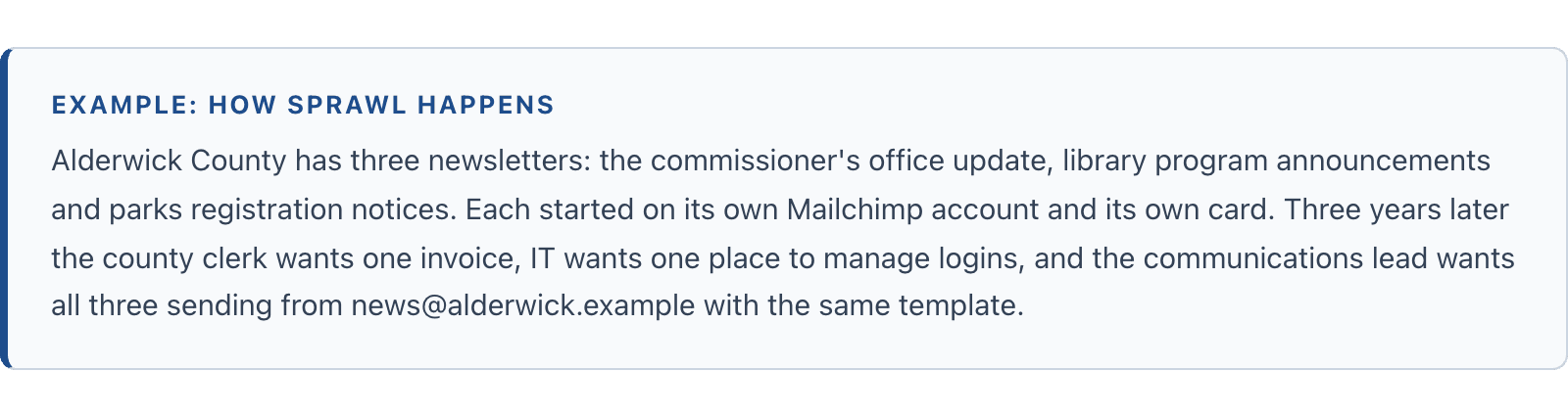
Example: how sprawl happens
Alderwick County has three newsletters: the commissioner’s office update, library program announcements and parks registration notices. Each started on its own Mailchimp account and its own card. Three years later the county clerk wants one invoice, IT wants one place to manage logins, and the communications lead wants all three sending from [email protected] with the same template.
Want to see how this would work for your agency? Walk through it with the Mailsoftly team.Book a demo →
Public offices usually outgrow Mailchimp for four reasons: user seats are capped by plan, prices rise with every contact stored, payment happens online in the account rather than through public purchasing, and the support channel depends on the plan. None of these is a flaw for a single sender. Each becomes friction once a newsletter turns into a shared government channel.
The Mailchimp pricing page for marketing plans lists 1 user seat on Free, 3 on Essentials, 5 on Standard and unlimited seats on Premium. Premium starts at $350 a month for lists up to 10,000 contacts and is $620 a month at 25,000 contacts. That jump is where the Mailchimp users limit hurts public offices most: an office with 5,000 contacts that needs a sixth login moves from $100 a month on Standard to $350 a month on Premium, without sending a single extra email. Shared logins are the common workaround, and they leave no record of who sent what, which matters for any public office.
Mailchimp prices plans by the number of contacts in the audience, and that count includes unsubscribed and non-subscribed contacts that stay stored in the account. A Mailchimp government newsletter tends to grow steadily: residents sign up at a town hall, a summer reading program adds families, a road project adds a notice list. On the same pricing page, Essentials runs $13 a month at 500 contacts, $75 at 5,000 and $270 at 25,000, while Standard runs $20, $100 and $310 at the same sizes. Offices that never archive old contacts end up paying for people who no longer receive anything.
Mailchimp’s pricing page does not describe purchase orders, invoice billing or payment by check; plans are selected and paid online in the account. For a public office that usually means a procurement card or a staff member’s card, monthly receipts filed by hand, and a renewal that depends on whoever holds the card. When that person changes roles, the account and its payment method often go with them. Support also follows the plan: the pricing page reserves phone support for Premium, so offices on Essentials or Standard work through online channels.
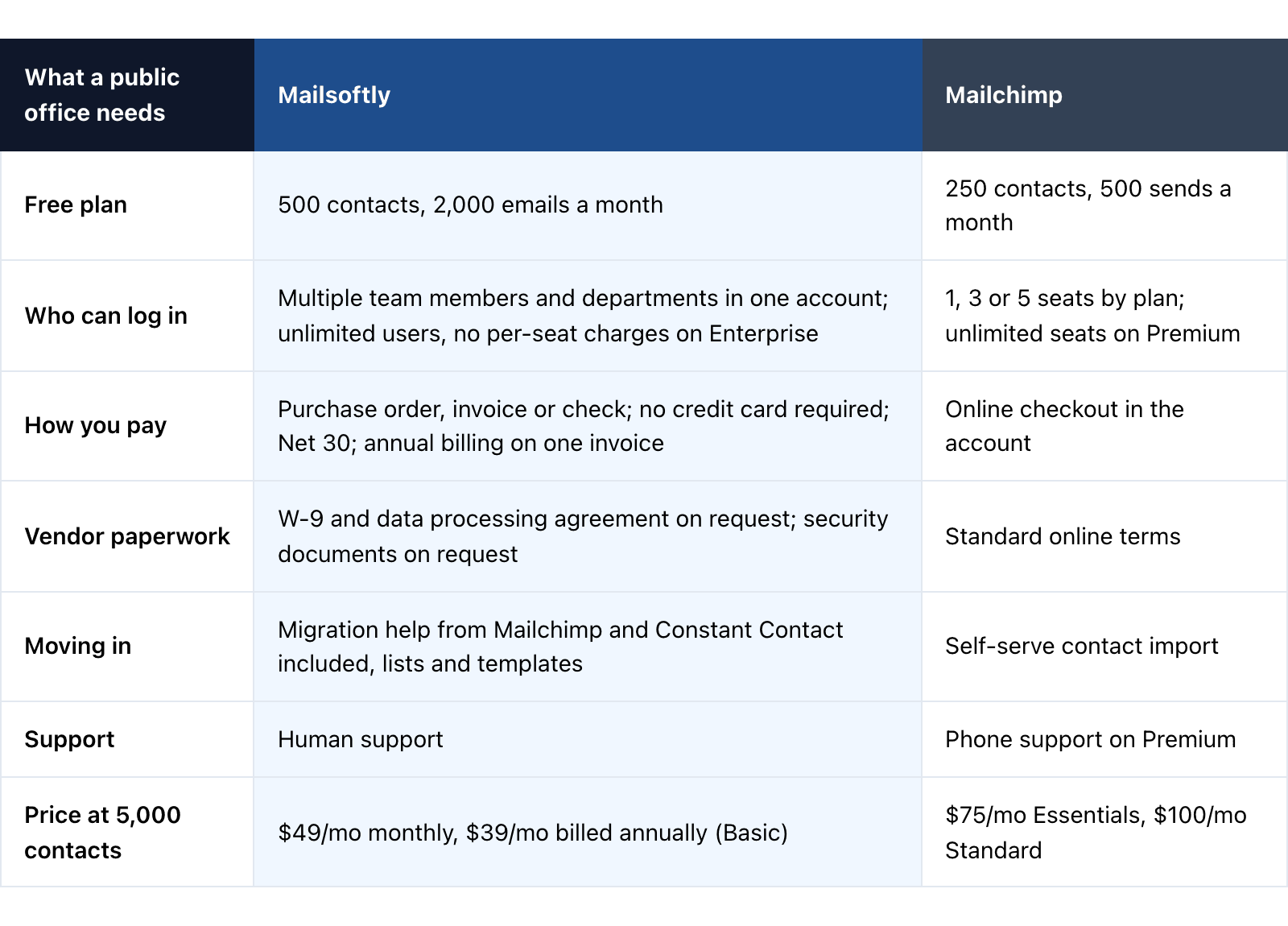
Mailsoftly is set up for the way public offices buy: purchase orders, invoices and checks on Net 30 terms, migration help, human support, and unlimited users with no per-seat charges on Enterprise plans. Mailchimp is bought online in the account and adds seats by moving up plans. The table below puts the practical differences side by side.
| What a public office needs | Mailsoftly | Mailchimp |
|---|---|---|
| Free plan | 500 contacts, 2,000 emails a month | 250 contacts, 500 sends a month |
| Who can log in | Multiple team members and departments in one account; unlimited users, no per-seat charges on Enterprise | 1, 3 or 5 seats by plan; unlimited seats on Premium |
| How you pay | Purchase order, invoice or check; no credit card required; Net 30; annual billing on one invoice | Online checkout in the account |
| Vendor paperwork | W-9 and data processing agreement on request; security documents on request | Standard online terms |
| Moving in | Migration help from Mailchimp and Constant Contact included, lists and templates | Self-serve contact import; expert migration help on Premium |
| Support | Human support | Phone support on Premium |
| Price at 5,000 contacts | $49/mo monthly, $39/mo billed annually (Basic) | $75/mo Essentials, $100/mo Standard |
At every list size below, the Mailsoftly plan that covers the list costs less per month than Mailchimp Essentials. Prices as of 2026-10-18. Mailsoftly prices show the monthly rate first, then the annual rate billed on one invoice; Mailchimp prices are regular monthly rates before promotions.
| List size | Mailsoftly | Mailchimp Essentials | Mailchimp Standard |
|---|---|---|---|
| 500 contacts | Free ($0, 2,000 emails a month) | $13/mo | $20/mo |
| 1,000 contacts | Starter: $19/mo monthly, $15/mo annual | $26.50/mo (501 to 1,500 tier) | $45/mo (501 to 1,500 tier) |
| 5,000 contacts | Basic: $49/mo monthly, $39/mo annual | $75/mo | $100/mo |
| 10,000 contacts | Business (up to 15,000): $99/mo monthly, $79/mo annual | $110/mo | $135/mo |
| 25,000 contacts | Premium (up to 30,000): $199/mo monthly, $159/mo annual | $270/mo | $310/mo |
Two notes help with budgeting. Mailsoftly Enterprise uses custom pricing with unlimited contacts and emails, which fits a county or city that wants every department on one account. Mailchimp’s seat limit applies on top of the contact tier, so the true comparison for a multi-user office is often Mailsoftly against Mailchimp Premium at $350 or $620 a month, not against Essentials.
A Mailchimp alternative for government should pass six checks before anyone compares templates: purchase order and invoice billing, no per-seat charges as the team grows, migration help, human support, domain authentication, and security documentation IT can review. If a vendor fails the payment check, the project usually stalls in procurement no matter how good the editor is.
Public office buyer checklist
Mailsoftly covers these checks, with unlimited users and no per-seat charges on Enterprise plans. It accepts purchase orders, invoices and checks with Net 30 terms and no credit card required, bills annually on one invoice that fits a fiscal year, includes migration help, and provides human support. Our page on email marketing for government agencies walks through how a county or city sets this up across departments.
Domain authentication proves to mailbox providers that a newsletter really comes from your office, which protects both deliverability and public trust. A resident who receives a meeting notice from [email protected] should see it land in the inbox, not in spam, and should be able to tell it apart from a spoofed message. Setting up SPF, DKIM and DMARC records is usually a short task for IT, and any platform you choose should walk you through it rather than leaving the sender on a shared default domain.
IT will ask where data lives, how it is protected and who can access it. Mailsoftly hosts the application and customer data in a single United States region, uses TLS in transit and encryption at rest, and lets administrators require two-step verification, restrict sign-in to Microsoft work accounts, set automatic sign-out and switch Mailsoftly support access off. An activity log records account actions. The infrastructure providers Mailsoftly runs on are SOC 2 Type II audited and ISO 27001 certified. Public sector customers can have a Regulated Environment profile set by contract, with AI features off by default. The full details are on the page describing how Mailsoftly protects customer data, and security documents are available on request.
Two other points come up in evaluations. Mailsoftly connects with Zapier, WordPress, Google Workspace, Microsoft 365, Shopify, a REST API and webhooks, so a city website or internal system can feed signups automatically. Mailsoftly can also send individual text messages through its API, which is switched on with the Mailsoftly team after a sending number is registered.
If your search goes beyond public offices, our broader roundup answering which Mailchimp alternatives are worth switching to covers options for growing businesses and other senders. Library foundations, friends groups and school support organizations that run as nonprofits can compare Mailchimp alternatives for nonprofits, since Mailsoftly gives nonprofits and schools 20 percent off.
Mailsoftly, Constant Contact, Granicus govDelivery and Campaign Monitor are the alternatives public offices compare most often, and each fits a different situation. The right choice depends on list size, how many departments will send, and whether the purchase runs through a simple PO or a formal procurement cycle.
Mailsoftly fits counties, cities, special districts and school districts that want one standard for newsletters, service notices and program announcements, paid by purchase order or invoice. It suits a Mailchimp alternative for cities where several departments need their own logins in one account, since Enterprise plans include unlimited users with no per-seat charges. Published plans run from a free plan for 500 contacts up to Premium for 30,000 contacts, and migration help from Mailchimp covers lists and templates.
Constant Contact fits a small office or community program that wants a long-established email and event tool with plans priced by contact count. It is a familiar name for parks and recreation teams that run event registrations alongside a newsletter. Offices should compare its user and billing options against their own purchasing rules before committing.
Granicus govDelivery fits large state agencies and big counties with a dedicated communications team and a budget cycle sized for an enterprise government contract. It is built specifically for the public sector, with topic-based subscriptions at large scale, and is bought through a quote from Granicus. For a single library, fire district or mid-size city, that scale and buying process can be more than the job requires.
Campaign Monitor fits a communications team that cares most about polished design and brand-consistent templates. It is known for its email builder and template quality, which suits a city communications office producing a visual monthly magazine. As with any option, check seats, billing method and support level against the six-point checklist above.
Moving a government newsletter off Mailchimp takes four core jobs: export the full audience including unsubscribes, rebuild the template, update the signup form on the website, and authenticate the sending domain. A small office can finish in a few days. Timing the switch to the fiscal year start or the Mailchimp billing date avoids paying for both tools at once.
Migration steps for a public office newsletter
Example: Thornmere Fire District moving its community newsletter
Do not skip the unsubscribe export. Unsubscribes are the most important file in the move, because emailing someone who opted out damages trust in a public office far more than a late newsletter does. Keep a copy of the original export with your records retention files, along with notes on how each list was collected.
Mailsoftly includes migration help from Mailchimp, covering lists and templates, so staff do not have to rebuild everything alone. For a field-by-field walkthrough, see our guide on how to switch from Mailchimp to Mailsoftly. Once the first issue goes out from the new account, cancel the old plan, and if several departments ran separate accounts, close each one so residents only hear from the office through the new, single standard.
For a county consolidating several Mailchimp accounts, move one department at a time. Start with the newsletter that has the cleanest list, use it to settle the shared template and sender address, then bring the others over. Each department keeps its own lists and logins inside one account, and finance receives one invoice instead of several card charges.
For the broader picture on this topic, see our complete Email Marketing for Government guide, which covers strategy, fundamentals, and advanced playbooks.
Yes, government agencies can use Mailchimp, and it suits a single office with one sender and a small list. Agencies that need purchase order or invoice billing, more user logins or one standard across departments often compare Mailsoftly, Constant Contact and Granicus govDelivery as alternatives.
Mailchimp allows 1 user seat on Free, 3 on Essentials, 5 on Standard and unlimited seats on Premium, which starts at $350 a month. By comparison, Mailsoftly Enterprise plans include unlimited users with no per-seat charges, so every department can have its own login in one account.
Mailchimp does not publish purchase order or invoice payment on its pricing page; plans are paid online in the account, so agencies that require a PO should confirm directly with Mailchimp. Mailsoftly accepts purchase orders, invoices and payment by check, with Net 30 terms and no credit card required.
No, residents who opted in on Mailchimp do not need to sign up again when you move them to a new platform. Export their records with signup dates, import unsubscribes as suppressions so opted-out contacts stay excluded, and keep the same sender name so the next issue is recognized.
No, Mailsoftly does not offer a separate government discount; public agencies pay the published plan prices or a custom Enterprise quote. Nonprofits and schools receive 20 percent off, and annual billing on one invoice is available for offices that budget by fiscal year.
See Mailsoftly with your agency in mindBook a demo →
Purchase orders and invoices accepted. Migration help included.
Ready to boost your email marketing?
Send beautiful, targeted emails that convert. Free plan available, paid plans from $15 a month.
Try Mailsoftly FreeNo credit card required